Home › Skyjo
A Skyjo score sheet on your phone
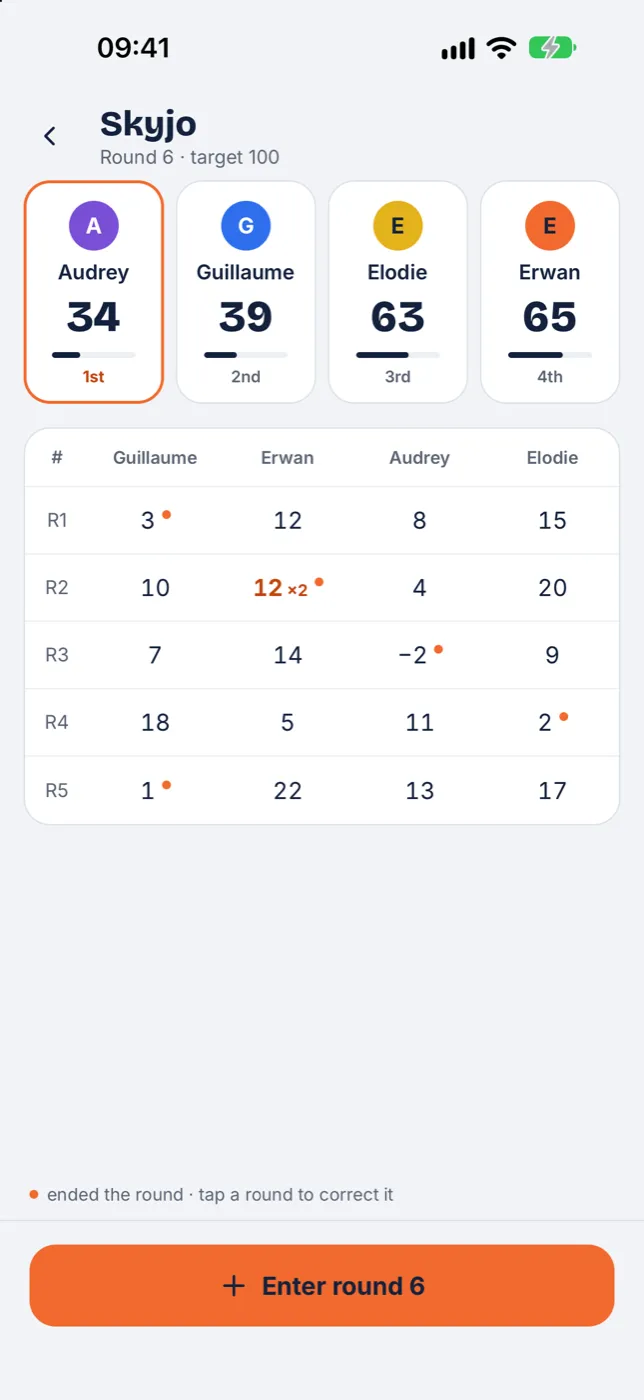
Enter everyone's score at the end of the round: the app keeps the totals, applies the doubling rule and flags the end of the game at 100 points.


Free · Offline · No account, no ads · iPhone, iPad and Android
How scoring works in Skyjo
- At the end of each round, every player reveals their cards and adds up their values, from −2 to 12. A column of three identical cards is discarded and scores nothing.
- The player who revealed all their cards first ends the round. If they do not have strictly the lowest score of the round, their score is doubled, provided it is positive.
- The game ends after the round in which a player reaches 100 points or more. The lowest total wins.
Example: Lea ends the round with 9 points, but Tom only has 7. Lea scores 18 points instead of 9.
Skyjo with Tour de table
- Select who ended the round, then enter each player's score, negative values included.
- The doubling is applied automatically and shown as you enter the round.
- The end of the game is announced as soon as a player reaches the target: 100 by default, editable when you create the game.
- Players
- 2 to 8 players
- End of the game
- A player reaches 100 points
- Winner
- Lowest total